Product
Your QGIS work, on the web, with its style and its metadata
ALIGN Connector for QGIS is in beta. It publishes a layer, a selection or a whole project from QGIS to your organization's Datastore, keeps the style and the metadata you wrote, and tells you before sending what will travel and what will not.
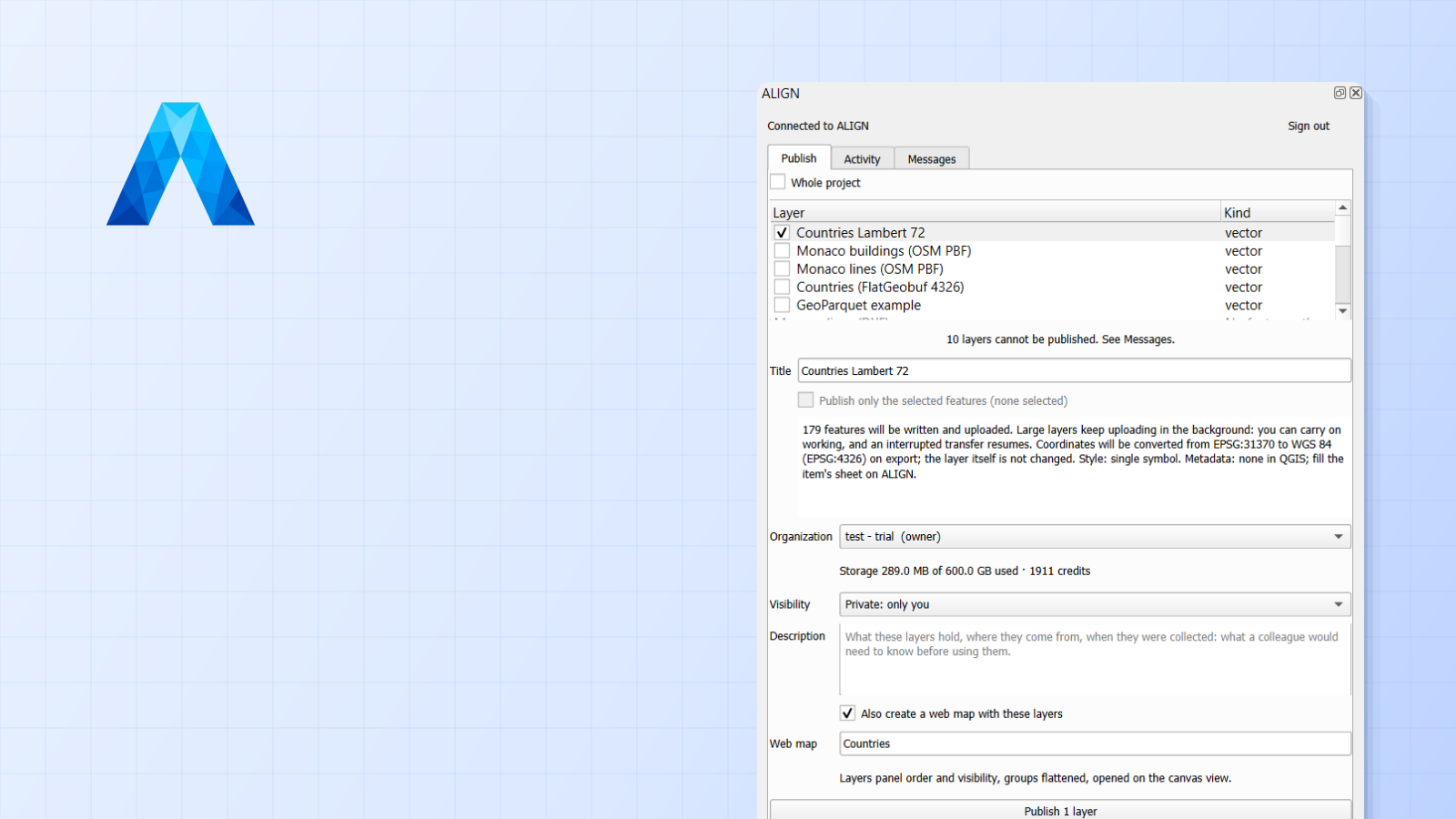
Most of the GIS work we see still starts in QGIS: a few files on a drive, a WFS connection, an afternoon of joins and symbology. Then comes the part nobody enjoys. Getting that work in front of a colleague who does not have QGIS, or the files, or the connection, means an export, an email, a screenshot, and a style redone by hand in whatever ends up hosting the map.
ALIGN Connector for QGIS is our answer to that afternoon. It is a QGIS plugin, free software, that publishes what you have on the desktop to your organization’s Datastore in ALIGN, and from there to the Map Builder, in a few clicks and without leaving QGIS. It is in beta today, in English and French.
What it does
The plugin adds a small ALIGN panel to QGIS. Tick a layer, several, or the whole project; pick the organization; publish. Each layer lands in your Datastore as an item in an open, cloud-native format: FlatGeobuf for vectors, Cloud-Optimized GeoTIFF for rasters, PMTiles for tile archives. A service you had connected in QGIS, a WMS, a WFS, an XYZ, an OGC API, an ArcGIS service, is not copied: ALIGN keeps the address and reads it live when a map opens, the way you would expect from a web GIS.
Tick Also create a web map and, once every layer has landed, ALIGN composes a web map with the order and the visibility of your Layers panel, opened on the extent you were looking at. The link appears in the panel; the map opens in the Map Builder, ready to be shared.
What travels with a layer
This is the part we cared most about, because it is where the afternoon is usually lost.
The style. A single symbol, a categorized or a graduated renderer becomes the Map Builder’s own style, editable there, not a frozen picture. A rule-based renderer made of equality rules becomes categories. The web cannot draw everything QGIS can: hatches, SVG markers, sizes in map units, expression-driven properties are simplified, and labels are not transmitted yet. The plugin does not hide it. Before you publish, the briefing under the layer and the Messages view list every simplification, so you know what you will find on the other side.
The metadata. If you filled Layer Properties → Metadata in QGIS, the abstract, the INSPIRE theme and keywords, the licence, the access constraints, the contact and the history fill the item’s metadata block in ALIGN. An organization that enforces a licence or a contact on every dataset keeps its own value, and the publication says so. Nothing is retyped.
The provenance. The item records that it came from QGIS, when, and from which coordinate system. A layer in Lambert 72 is converted to WGS 84 on export, the layer in QGIS is left alone, and the item says reprojected from EPSG:31370.
What it refuses, and when
A publication is a transfer, and a transfer that fails at the end is the worst kind. So the plugin checks before the first byte: the organization’s remaining storage, the credits a raster conversion will need, your role, whether the organization has turned desktop plugins on at all. A publish that cannot succeed is refused in seconds, in your language, with the remedy.
The panel also tells you what has no path to a web map, rather than letting you find out later: a table without geometry, a local point cloud or mesh, a WCS connection, a WMTS outside Web Mercator. Each has its reason in the Messages view.
What it does not do yet
We would rather write the limits than let you discover them. The plugin publishes; it does not read your Datastore back into QGIS. For that direction, your ALIGN layers are served as OGC API Features, which QGIS opens natively, no plugin needed. Raster tiles from an MBTiles are stored but not shown in the Map Builder yet. Labels stay in QGIS for now. And there is no Processing algorithm yet: the panel is the only way in, until the algorithm that will let models, batch runs and agents publish ships.
Why a plugin, and why open
Your work belongs to you, and so does the way you move it. The plugin is GPL, its source is readable, and it talks to ALIGN through the same authorization flow any application would: you approve the connection in your browser, QGIS gets a token scoped to publishing only, and you can revoke it from your settings whenever you want. The formats it writes are the open ones the whole ecosystem reads. If you leave ALIGN tomorrow, you take your FlatGeobufs and your COGs with you.
Try it
The plugin is in beta. Add https://aligngeo.com/qgis/plugins.xml to your plugin
repositories in QGIS 3.22 or newer, QGIS 4 included, tick “experimental”, and install
ALIGN Connector like any other plugin. The
documentation walks through installing, signing in,
publishing, and every refusal with its remedy. We read every report: the beta is how we
find the layer we have not thought of.