
QGIS plugin
ALIGN Connector is a QGIS plugin that publishes what you have on the desktop to your organization’s Datastore: one layer, several, or the whole project as a web map. It carries your identity, never grants anything by itself, and shows you what the server answers. It is free software (GPL), with its source on GitHub, and it talks to ALIGN with the same permissions you have in the browser.
The plugin is in beta: it is distributed from ALIGN’s own plugin repository until it reaches the official QGIS one.
Install
Section titled “Install”- QGIS 3.22 or newer, QGIS 4 included (the plugin runs on Qt5 and Qt6 from one source; it is developed against the 3.44 LTR).
- In QGIS, Plugins → Manage and Install Plugins → Settings: tick Show also
experimental plugins, then under Plugin repositories click Add with the name
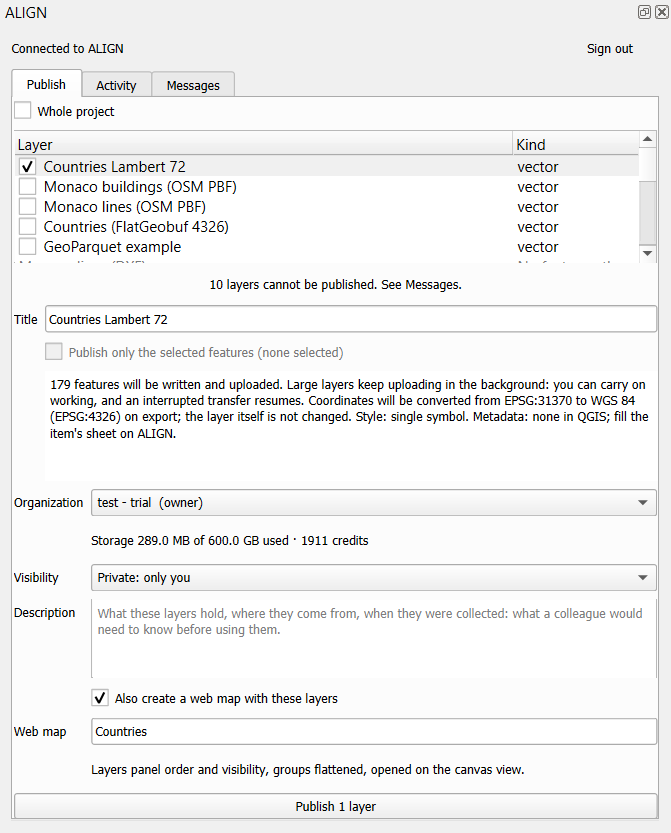
ALIGNand the URLhttps://aligngeo.com/qgis/plugins.xml. Back in All, search ALIGN Connector and click Install Plugin. Updates then arrive like any other plugin’s. (Prefer a file? The same address serves the ZIP, for Install from ZIP.) - The plugin adds one ALIGN button to the toolbar: click it for the panel, open its arrow for Sign in, Open ALIGN in the browser and Settings. The same entries sit under the Web menu, and Publish to ALIGN… is in the context menu of any vector or raster layer.
Nothing else to install: no Python package, no key to paste. The plugin speaks the language QGIS runs in, English and French today.
Sign in
Section titled “Sign in”Web → ALIGN → Sign in to ALIGN… opens your browser on ALIGN, where you approve the connection, the way you would authorize any application. QGIS receives a token scoped to publishing only: the plugin cannot read, list or download your organization’s data with it.
Two things govern that connection:
- Your organization must allow desktop plugins. An owner or admin turns it on in Settings → Integrations. Until then, a publish is refused with a message that says exactly that.
- You can revoke it any time. Every connected QGIS appears on the QGIS card of Settings → Integrations, where you revoke it; signing out from QGIS revokes it server-side too.
Your role decides what you may do, as it does in the browser: a viewer cannot publish. See Roles.
Publish
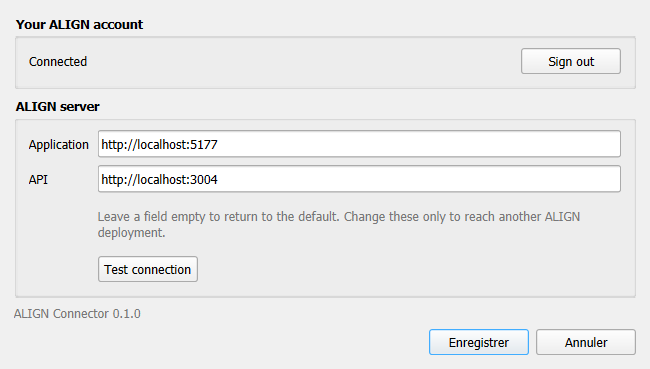
Section titled “Publish”Open the ALIGN panel (toolbar button, or Publish to ALIGN… on a layer). The Publish view lists the layers of your project in the order of the Layers panel; tick one, several, or Whole project.
For each ticked layer the panel shows a briefing before anything leaves QGIS: how many features will be written, whether coordinates will be converted to WGS 84, what becomes of the style, what metadata travels. Read it; it is the contract of that publication.
Then choose:
- Organization, with its remaining storage and credits under the picker.
- Title, proposed from the layer’s metadata title when it has one.
- Visibility: private to you, or shared with the organization.
- Description, for the item’s sheet.
- Publish only the selected features, for a vector layer with a selection.
- Also create a web map with these layers: once every layer has landed, ALIGN composes a web map with the Layers panel order and visibility (groups flattened), opened on the extent you are looking at, and the Activity view gives you its link.
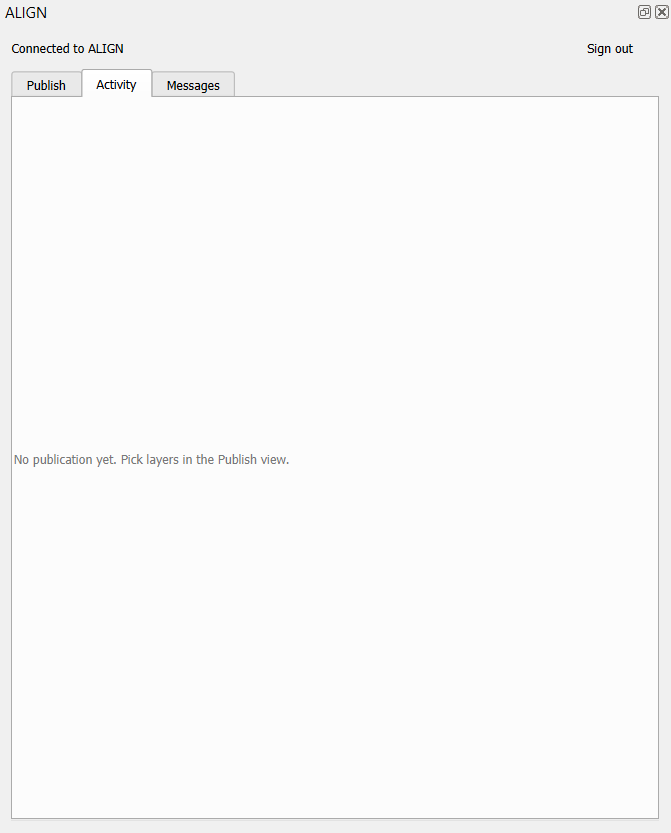
Large files keep uploading in the background: you can carry on working, and an interrupted transfer resumes where it stopped. The Activity view follows each publication and ends with Open in ALIGN.
Replace a published layer
Section titled “Replace a published layer”A layer you published keeps the item it became, in the project file: reopen the project a week later, correct the layer, publish again, and the panel says Already on ALIGN: published in … on … with Replace the item already on ALIGN ticked. The item keeps its identifier, so every web map that shows it shows the new version at its next load; the previous version is kept on ALIGN; the Activity line names the attribute fields that were added, removed or retyped, because a pop-up or a style that read one of them will need attention.
Untick the box to publish a new item instead. A replacement is refused, with its reason and the same remedy, when the item is not yours to write (only its creator or an organization admin may), when the export is another format than the item’s, or when the item was converted on arrival (a GeoTIFF turned into a COG, an MBTiles turned into PMTiles), which cannot be replaced in place yet. An item that was deleted on ALIGN is published as a new one, and the Activity line says so.
What is published
Section titled “What is published”| Your layer | What is sent | What ALIGN stores |
|---|---|---|
| Any vector layer QGIS can read | FlatGeobuf in WGS 84 (reprojected on export; the layer itself is not changed) | one layer, served as it is |
| A vector layer read from a FlatGeobuf or GeoParquet file already in WGS 84 | that file, byte for byte | the same file |
| A vector tile layer read from a PMTiles or MBTiles archive on disk | that archive, byte for byte | the PMTiles (an MBTiles is converted on arrival) |
| A raster stored as a GeoTIFF | that file, byte for byte | a Cloud-Optimized GeoTIFF, prepared on arrival |
| Any other raster GDAL can read | a compressed GeoTIFF written for the occasion | a Cloud-Optimized GeoTIFF |
| A service: XYZ, WMS, WMTS, WFS, OGC API Features, ArcGIS Feature or Map Service, vector tiles, a remote COG or PMTiles, a point cloud or 3D Tiles by URL | its address and the layer name, no data | a live reference, read when the map opens, one per service |
Three things travel with a vector layer:
- The style. Single symbol, categorized and graduated renderers become the Map Builder’s own style; a rule-based renderer made of equality rules becomes categories. What the web cannot draw (hatches, SVG markers, sizes in map units, expression-driven properties, labels) is simplified, and the briefing and the Messages view say so before you publish. One difference to know: QGIS hides a feature that matches no category, the web map draws it. Without an “all other values” row, such features arrive in a neutral, translucent grey that belongs to no class, and the briefing says so; add the row in QGIS to choose their look. Raster styling is not transmitted.
- The metadata. What you wrote in Layer Properties → Metadata (abstract, INSPIRE theme and keywords, licence, access constraints, contact, history) fills the item’s metadata block. A field your organization enforces for every dataset keeps the organization’s value, and the publication says which.
- The provenance. The item records that it came from QGIS, when, and from which coordinate system.
A reprojected raster is kept twice: your original and the display-ready copy, both counted against your storage. A service is kept as a reference, the way ArcGIS Online keeps it: ALIGN stores the address, reads the service when a map opens, and reuses one item for the same service however many times it is published. A service whose address carries a key or a signature is refused: a reference never stores a credential.
What is not published
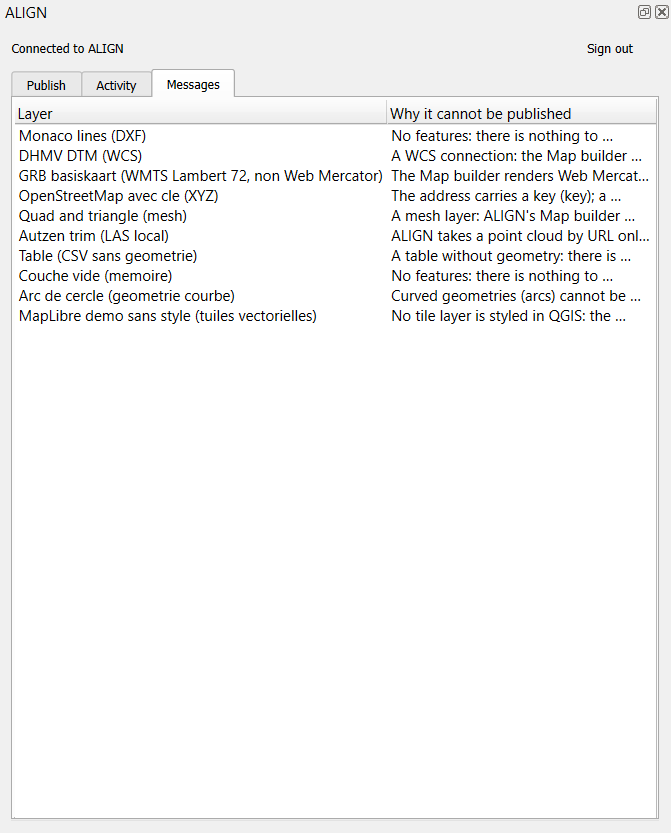
Section titled “What is not published”The Messages view lists every layer the plugin will not send, with the reason:
- a table without geometry, an empty layer, curved geometries (segmentize first);
- a local point cloud, mesh or 3D scene (ALIGN takes point clouds and 3D Tiles by URL only);
- a WCS or ArcGIS Image Service connection (nothing to publish, and the Map Builder does not read them live);
- a WMTS layer outside Web Mercator tile matrix sets;
- an XYZ template with subdomain or flipped-row placeholders.
Raster tiles from an MBTiles archive are stored but not shown by the Map Builder yet. Labels are not transmitted yet: add them in the Map Builder.
Refusals and remedies
Section titled “Refusals and remedies”The plugin reports what the server answered, in your language:
| What you read | Why | What to do |
|---|---|---|
| Your ALIGN session has expired | the token was revoked or expired | sign in again |
| This organization has not enabled the QGIS plugin for its members | the Desktop plugins setting is off | an owner or admin turns it on in Settings → Integrations |
| Your role in this organization does not allow publishing | you are a viewer there | ask for an editor role, or publish to another organization |
| Converting this file needs N credits; this organization has M | a raster or a tile archive must be converted on arrival, and the estimate exceeds the balance; nothing was transferred | add credits in Plans & Capacity, then publish again |
| There is not enough space left in this organization’s Datastore | the file would exceed the plan’s storage; checked before the first byte | free space, or move to a larger plan |
| ALIGN does not accept this file type | a format the Datastore cannot serve as it is | let the plugin convert (it does for every QGIS layer), or import from the web application |
The storage check and the credit estimate happen before the transfer starts: a publication that would not fit is refused in seconds, not after an hour of uploading.
Automate
Section titled “Automate”The plugin adds an ALIGN provider to the Processing toolbox with one algorithm,
Publish layer to ALIGN (align:publishlayer). It publishes exactly as the panel
does, with the layer’s style and metadata, and is usable from the Modeler, the batch
runner, the Python console, and any MCP bridge that lets an agent run Processing
algorithms. Sign in from the panel first: the algorithm never opens a browser.
import processing
result = processing.run("align:publishlayer", {    "INPUT": "Countries",                 # a layer, its id or a file path    "ORGANIZATION": "Town GIS",           # the organization's name or id    "TITLE": "",                          # empty: the layer's metadata title, else its name    "DESCRIPTION": "Boundaries, 2026 edition",    "VISIBILITY": 1,                      # 0 private, 1 organization    "SELECTED_ONLY": False,    "REPLACE": True,                      # replace the item this layer was published as, when it lives in this organization})print(result["ASSET_ID"], result["ALIGN_URL"])
REPLACE is on by default: a layer that remembers its item is replaced in place, as
from the panel; set it to False for a new item every run.
Every refusal of the panel is a refusal of the algorithm, in the same words: not signed in, no such organization (the message lists yours), a layer that cannot be published, the organization’s switch, the role, the storage, the credits. A service layer is refused with a pointer to the panel, which registers it as a reference.
Report a problem
Section titled “Report a problem”Bugs and requests go to the plugin’s issue tracker on GitHub. Before you write, open the Messages view of the ALIGN panel and click Copy diagnostic (also under the toolbar button’s menu), then paste it in the issue. It holds what a reader needs to reproduce: the versions of the plugin, QGIS, Qt and Python, the system, the ALIGN addresses the plugin talks to, whether you are signed in, the names of your organizations, the last publications with ALIGN’s refusal codes, and the layers the panel refuses with their reason. It never holds a token, an e-mail address or an account identifier, and nothing leaves your machine until you paste it. The plugin sends no telemetry.
Related pages
Section titled “Related pages”- OGC services: the other direction, reading your ALIGN layers in QGIS without this plugin.
- The page of an item: where a published layer lands, with its provenance and its metadata.
- Roles: who may publish.
- Plans, usage and billing: the storage and credits a publication draws on.